Showing posts with label Tech Trends. Show all posts

Monday, 28 January 2019

PUBG PC LITE: for free and for low specifications pc's


PUBG (Players unknown battleground) is one of the most popular games which are played in 2018, PUBG is a battle royale video game, survive to the last person or squad to get the winner winner chicken dinner. PUBG PC has some major problems one of them is it's too buggy and its require very high specification to run on pc and it is not free to play.
some people use the emulators for run PUBG MOBILE in pc or use the official Tencent emulator to run PUBG mobile. Tencent Emulator for PUBG is better than PUBG pc because it is run on any low spec pc and it is totally free to play. Now Tencent launches new PUBG pc for those who want to run PUBG in low spec and free of cost.

The system requirement of PUBG lite


PUBG lite is for the mid-range specs systems its system requirements are very low.

  • Windows 10, 8.1 and 7 64-bit are supported.
  • Intel Core i3 processor with up to 2.4GHz clock speed.
  • 4GB of RAM
  • Intel HD Graphics 4000
  • Internet connection is required.
  • 4GB of available space.
PUBG


How to download and install PUBG lite

PUBG Lite is currently available in Thailand global version is soon available but if you want to try PUBG lite then you can use Thailand VPN server for download and play.
PUBG PC is you also try its beta version and play.


  • Firstly setup your VPN to Thailand. and make sure that VPN is trustable and the server is good for downloading.
  • Create an account for PUBG lite using the link https://lite.pubg.com/
  • Now confirm your account using sent message through an email.
  • Now connect your PUBG lite account to steam account.
  • Download PUBG lite link:- https://lite.pubg.com/
  • after downloading login through the PUBG lite account then it downloads the game data.
Note:- VPN should be connected through the whole process.

PUBG PC lite graphics is similar to the PUBG mobile but its controls are similar to the PUBG PC.

Monday, 24 September 2018

E-sim technology and its future in India


Recently Apple Launches his new phones Series X with the support of dual sim, But in India, one of these sims is an E-Sim and another is a regular physical sim. iPhone Xs max, Xs are available with the support of E-sim. currently, in India Jio and Airtel are the cellulars networks who avail the E-sim facility to their networks.

What is an E-sim


E-sim is known as electronic Sim card or Embedded sim card that does not exist physically although it contains a small chip inside a phone that helps to access the networks. Basically, the e-sim can't be removed but you can change the cellular networks or you can disable this feature. and the information of the e-sim is can be manipulated or overwrite.

E-sim is introduced in 2016 and it was previously based on the only 3G networks. Samsung galaxy gear S2, but E-sim popular after the Apple watch 3 edition support of E-sim. Then there are many devices come that supports the E-sim facility like Google pixel 2.

Benefits of using the E-sims 

E-sims is currently using in smartphones to maintain the design of the smartphones E-sim does not occupy the extra space for using any sim slots. Using E-sim that eliminate the problem of many sim cards and at the time of changing cellular network provider, to change network provider in E-sim you only need to call the network operator. to using E-sims you need only QR code.

E-SIM is very useful for those people who regularly travel or does not stay in a particular state or country less than 6 months than they should change their network provider every time and it is quite a time-consuming process but using e-sim they can charge network provider easily.
The phone design is another main reason for because the sim slot occupies more space in the phone that is why using E-sim is a good decision for the manufacturer to add the extra hardware in the Gadgets.

Thursday, 13 September 2018

Apple Announced new Iphone X series


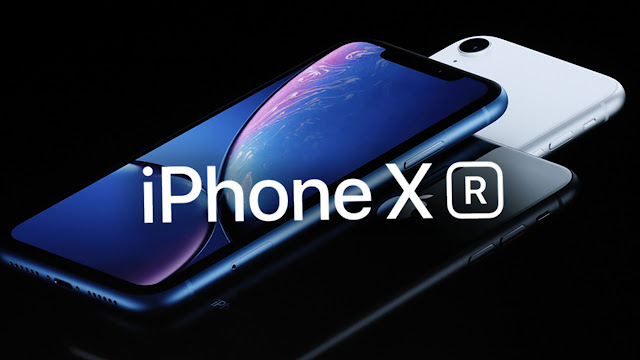
Apple launches a new iPhone series in California and also launch Apple watch series 4, They announced 3 Phone named as iPhone XR, iPhone Xs, iPhone Xs Max. Apple refers to as an iPhone X successor. These series come with 3 new phones with the very good specifications. The special attraction to these phones is these phones support Dual Sim One sim is Physical and other is e-Sim. The iPhone XR comes with large screen of 6.1 Inches IPS LCD display also known as the Liquid retina Display, The iPhone Xs comes with the 5.8 Inches Display and iPhone Xs Max has comes with large screen of 6.5 Inches, both phones come with an OLED display. These phones have a similar design to iPhone X.


In these post, we discuss the Specification, the price of these smartphones.

Specifications

Display and Camera

iPhone XR (Ten-R)

The iPhone XR has the large screen of 6.1 Inch Liquid Retina Display and resolution 828X1792 19.5:9 screen to body ratio with a big sized notch, the iPhone XR does not have any 3D touch similar to other iPhones.
The Camera specification is lower when compare than the other Two iPhones, This phone has is a single camera set up at a back of a 12MP rear camera f/1.8 Aperture this phone does not have a dual camera and 2X zoom although you can use portrait mode with Depth control, video record 4K at 60fps with 2X fast sensor. The front camera is 7MP with the support of Face ID. 

iPhone Xs and iPhone Xs max 


these phones iPhone Xs and iPhone Xs max have the screen size of 5.8 Inch and 6.8 Inches respectively Both the phones have OLED display and resolution 1,125 x 2,436px and 1,242 x 2,688px 19.5:9 screen to body ratio with a big sized notch.

The camera is similar to the iPhone X a 12MP f/1.8 and f/2.2 dual rear camera support of OIS and the front camera is 7MP f/2.0 Aperture. with true tone flash.

Physical Appearance and design

These Smartphones has the similar design to the iPhone X, these phones have 19.5:9 aspect ratio. These phones contain almost every sensor

Hardware and Performance

iPhone XR, iPhone Xs, and Xs Max have the latest IOS 12 with apple A12 bionic chipset, which is a hexacore CPU. and GPU is Apple GPU of 4-core graphics. Performance in these three phones is similar. These phones have the improved face ID Support which is faster than the iPhone X face ID,
phone contain is single sim slot while other sim use as an e-sim. 

Price and availability

The iPhone XR is available in three variants 64GB, 128GB and 256GB and the base variant price are 76,900 preorder starts on 19th October.

iPhone Xs and Xs Max are also available in three variants and three color option space grey, silver, and golden finish. iPhone Xs is starting at price of 99,000 and iPhone Xs Max is starting at 1,09,000,
both phone available on 28th September in India.

Opinions or Thinking

The iPhone XR is the good phone for those who only want to use an iPhone, this phone has the good chipset but the camera and screen are below than the iPhone X an iPhone XS.
The iPhone Xs and iPhone Xs Max are also having the similar designed to the other X series. all phone have minor changes.

Wednesday, 5 September 2018

Best smartphone for gaming

Every gamer wants to enjoy the latest and favorite gaming titles on the smartphone because it was convenient to handle and anywhere you can go, it was very easy to carry.
But the major drawback of gaming on a smartphone is that smartphone does not handle the gaming for last long. and its battery was draining so fast.
there is a smartphone which has the capability to run any game and its made only for the purpose of gaming.

The xiaomi is going to launch there new BLACK SHARK mobile phone in India. Its first gaming smartphone was launched on April 13. The company has revealed the news on the Chinese website. now this mobile is going to launch in India soon.

Xiaomi Black Shark full specifications

GENERAL

release date                             September 27, 2018 (expected)
form factor                             Touchscreen
Dimensions                            161.62 x 75.40 x 9.25 mm
Weight                                   190.00 g
Battery capacity                    4000 mAh
Colors                                    Polar Night and Sky Grey

The basic specification of this smartphone or you can say that a gaming smartphone is quite impressive because it has good physical and well designed for gaming easily

DISPLAY

Screen size                            5.99 inches
Touchscreen                          Yes
Resolution                             1080x2160 pixels

The display of the black shark is big enough for gaming, the large display helps to operate amazingly. the resolution is also good for full HD gaming.

HARDWARE

Processor                               2.8GHz octa-core
Processor                               Qualcomm Snapdragon 845 2.8 Ghz
RAM                                      6 GB
Internal storage                      64 GB
Expandable storage                NO

Every smartphone has a required gaming specification for any specific games to play games without lag. This smartphone has a specification which can play high end games.
The processor Qualcomm Snapdragon 845 which is the current one of the best processor, with 6 GB ram for run games and 64 GB storage is good enough for store games.


CAMERA

Rear camera                          20-megapixel
Rear Flash                             LED
Front camera                         20-megapixel

SOFTWARE

Operating System                 Android

The Android platform is best for the smartphone gaming because of its large number of games collections.

CONNECTIVITY

Wi-Fi                                      Yes
GPS                                        Yes
Bluetooth                                Yes, v 4.00

SENSORS
Proximity sensor                      Yes
Accelerometer                          Yes
Ambient light sensor                Yes
Gyroscope                                Yes


Opinion and Review

This smartphone is the main aim to target those people who want gaming in the smartphone, and this smartphone fulfills all the requirements for gaming, as well as basic smartphone needs like camera and calling facility. the design is very helpful for the gaming experience.

Sunday, 2 September 2018

Artificial Intelligence and how its work

What is Artificial Intelligence?


Artificial intelligence (also known as AI) is a technology that embedded in any machines or software and they work automatically according to its own intelligence. It uses purely its own artificial intelligence and to study its environment and take the decision which decision is right.
Artificial Intelligence is a theory which made in 19's decade, its created for finding a good replacement of the human brain and by using any machine or program. The main perspective for creating Artificial Intelligence is to find the copy of the human brain. 

Working of AI in human life


Artificial Intelligence or AI is used for solving the problems like a human to reduce the complexity for humans. It is used developed many types of machines and software for example Robots, games like chess. Artificial Intelligence is learning the based program, which automatically decides its working to analyze users behavior and environment.

AI Uses


In programs

Artificial intelligence is used in programs to create program efficient for the people to use programs that help the programs to choose its own working. The Assistant in search engines is the great example of Artificial Intelligence, like Google assistant, iPhone Siri, Windows Cortana, and Amazon's Alexa. These are the software or programs that use the Artificial Intelligence properly to give an answer. Basically, it is a set of predetermined answers that they give an answer to its user according to the program own intelligence. 

Gaming


Artificial Intelligence is mostly used in gaming, Artificial Intelligence makes games more unpredictable. in the chess game, the program is used the Artificial intelligence that decides its next turn after the player its turn.

Machines


Artificial Intelligence is almost used in everywhere in the current generation. In robotics, Artificial Intelligence is the most common and important part because of Artificial intelligence the robots can make the decision. for more reviews like this visit govtkings.com,the robots are used in many places, robots are work in the factory to minimize the accidents conditions and military to using robots and some drones and small machines that collect data from the remote area.

Machine Learning


Machine learning is a part of an Artificial Intelligence that helps the machine to learn things and use it at the time user needs it in many ways. Machine learning is used in some kind of character recognition software which the software used to recognize the writer.

The disadvantages of using Artificial Intelligence

Artificial Intelligence is very beneficial to our new generation, but the AI can cause some harm to the people in the other ways like it causes the main to the workers which are replaced with the AI., for example, the artificial intelligence cars can replace the work of driver and it causes the unemployment to the poor people.


Wednesday, 29 August 2018

Google Tez is now Pay


Google recently announced in an event of Google for India to an app named Google Pay literally it was a previous application known as Google Tez. Google Tez is a mobile payment app that uses the UPI  to transfer the money which is the safest way to transfer the money to others. There is no required to log in or create an account to use this. Google Tez released in September. In this few time, Tez was rapidly increasing their databases reach the 1,2 Million + users. The Google Tez interface is quite simple for the users to use. Google wants to reach the 1.5 lakh retail partner to the Diwali.

Google Pay Changes and updates

The Google Pay app does not have many big changes or updates, some minor features that can you see in the Google Pay app are now can connect through the main banks of India. Google Pay now is more fast and secure and its avail the feature of making credit to banks and take loans. Google pay can be used in HDFC, ICICI, Federal Bank and Kotak Mahindra banks as soon as possible. Creating credit from Google pay is easy to process because it uses very less paperwork, Google says that it would be as a term of conditions of Banks.

Features that can be Useful for consumer


  • The User Interface of Google pay is similar to the previous application Google Tez and is simple.
  • Google Pay application uses UPI features that can use the consumer bank account to transfer the money and receive the money.
  • Google Pay application has good security options like Google Pin, Google uses the Fingerprint and Face scanner to authenticate.

Sunday, 26 August 2018

Mobile Payment Methods : Paytm, PhonePe, Google Tez and freecharge Comparison with diffrences


Online transactions are now becoming popular and there are many ways to transfer money through online, for example, using debit or credit card in net banking in the smartphones that can be used through the UPI you can also use in a featured phone using USSD code *99#, but we are discussing the topic of Online transaction that can be using any wallet apps for example:

  • Paytm
  • PhonePe
  • Freecharge
  • Mobikwik
  • Google Tez

There are many digital wallets are available in India but these are the most used and digital wallets and over a million+ downloads in the Google Play store.
The main benefit of using digital wallets in the smartphone is that you can go cashless and instant money transfer without the need of carrying money, its safe to use that uses the authentication process which safe the transaction mostly wallets 128bits security that safe and record every transaction. Another advantage of digital wallets that you can handle more than 1 card or bank account.
We discuss the features and details of the most used wallet apps in android and comparison

Paytm

Paytm is a private Indian digital wallet Initially, it was used to recharge the DTH and mobile prepaid recharges. Later it adds on more and more services time to time. now Paytm has a huge number of users database over 30 Million+ users, It also available some offers to attract and to promote their app, That is why Paytm also added new features from time to time. Paytm introduce his Paytm mall to buy items for a discount. Paytm wallet money can be transferred into a bank account on an interest of 3 %.

  • Paytm is a wallet app, it also launched on its own Paytm mall app which has more than 3 million products.
  • Transfer money directly to bank your account
  • Get different offers and cash back to use its features and Benefits of KYC.
  • It is the most used wallet apps that you can find most of the people using it.
  • It has the added the chat box feature.

PhonePe

PhonePe is also a popular Indian mobile wallet application, which is licensed by Reserve bank of India. It also has a big number of users database of 10 Million+ user. PhonePe is also availed feature of transfer the money at the time of calls someone and using UPI.

  • PhonePe covers almost every banks of India.
  • the complete e-KYC process to avail the extra features.

Freecharge

Originally it was an e-commerce website that recharges the mobile prepaid and postpaid bill, DTH, Data card and many more. Now it can use as a payment transaction application Over 10 Million+ users use this app.  Freecharge is the first electronically money transfer based application. This application is not the same as the others like Paytm and Phonepe. It does not use to transfer the money.
  • It has added the feature to donate money directly to the NGO's.
  • Application User Interface is simple as to others.

MobiKwik

Mobikwik is an Indian company which is kinda similar to freecharge that uses to the payment of bills. It is authorized by Reserve bank of India, now its user database has reached to over 9 Lakh +.
Mobikwik launches its e-wallet feature on 2012. In November 2016, Mobikwik his lite version for those who are using poor or 2G connections.

  • MobiKwik refunds the money instantly in case you cancel any ticket or booking in your mobile wallet.
  • Mobikwick available for IOS, Android and window phones users.
  • It also availed the different offers to promote its app.

Google Tez

Google Tez is a mobile payment app that uses the UPI  to transfer the money which is the safest way to transfer the money to others. There is no required to log in or create an account to use this.
  • Google Tez released in September. In this few time, Tez was rapidly increasing their databases now its reach the 6 Lakh + users.
  • Google Tez has a very simple user interface
  • Simple UPI transaction only
  • No needed of login and signup for using

Friday, 17 August 2018

UPI is now upgraded as UPI 2.0, and its new features

What are UPI and its usage

Currently, the internet is rapidly spread through the person to person even in some rural area can use the internet facility, most of the things are possible to do with the help of internet but the transaction of money through internet is a kinda difficult process to do for everyone. In this case, UPI helps to resolve this problem for the users who don't use the currently available payment methods. UPI stands for the Unified Payment Interface which avails the feature of access or using the bank account anytime and safely. Using UPI you can transfer money to others or pay bills using UPI. 
UPI is the initiative of NPCI (National Payment Corporation Of India) which is the official payment transfer authorization of India.
UPI can be used through the different banking app, UPI is available in almost every banking app. UPI creates a virtual ID which used to transfer money to others.
It is slightly different from the wallet apps for example because of it uses the transaction from one bank to other and no medium payment gateway.
BHIM (Bharat Interface for money) is the application which you use UPI for the transaction using set MPIN and your UPI pin you send to others UPI users. There is the name of the application which uses  UPI that are Paytm, PayPal, and freecharge and banking apps it uses MPIN and UPI pin to authenticate the user by OTP. The RBI (Reserve bank of India) governer Urjit Patel launched UPI 2.0 formally in NPCI (National payment corporation of India) Mumbai.

UPI 2.0 and its upgraded features

recently NPCI (National Payment Corporation Of India) announced his upgrade of its previous payment interface UPI to UPI 2.0 it has comes with advanced features 
The features we get on the new UPI 2.0 are:

Linking of Overdraft Account

Using new UPI 2.0 you connect your overdraft account, saving account and current account. Now the customer can transfer or payment using your overdraft account which is unavailable in the previous version. now overdraft payment is fast and easy,

One Time Mandate

 One Time mandate is now available in the UPI 2.0 which enable to the authorize the transaction before the payment and then the amount will deduct from the account. it digitizes all Cash on a delivery transaction using signed intent or QR code to check the merchant is verified by UPI or not.

Invoice in inbox

this feature helps to check received invoice before payment it will also verify UPI credential using QR code.

Signed intent and QR

it is the major changes that found in this version which avail the facility to check the authenticity and the UPI credential to the merchant before the transaction and then transfer the amount. if the merchant is not verified then its notified by a message.

UPI 2.0 has come with the above feature that becomes UPI more secure and easy to use everyone, it also has the feature that refunds the transfer money and it takes plenty amount as in block and debits it later.

Tuesday, 7 August 2018

Android 9(PIE) and Its features: With Artificial Intelligence Support


Google launch his latest android version officially, and now it comes with the smart technologies, smart navigation and many more. This latest android version comes with the Artificial Intelligence which is also demanding for the next generations smartphones. Google has already revealed some of the features in the beta version of Android P.
The Android P has some cool new features upgrade from the previous version of Android Oreo.
Now let's check the specification, features and compare with the previous version how it is more reliable and good or its just give minor changes in the post.

TOP FEATURES OF ANDROID PIE

Adaptive Technology


Google announced the new feature of the Adaptive technology with its Battery and brightness, basically it's adaptive term uses the Artificial Intelligence to check the user's day to day app usage and frequency of work with apps and system will decide how many power will supply to the App.
Similarly, Adaptive brightness also works with the same way app usage will decide how the app needs the phone brightness, it likes to the auto-brightness but with the app significance.

Auto Customised app actions


App Actions is the feature which helps to maintain the app shortcuts according to the place and time which app you use then it recognizes it and every time the situation occurs it automatically suggest the app to use. For example, if you use the music apps while you traveling then next time it suggests music players.

Simple User Interface with using gestures


the new android PIE has come with a new interface in which the bottom navigation keys are removed and the only home button will be available all work is done through the gestures, 

App usage Dashboard


the dashboard provides to monitor Ap
p and determine how frequently and how many time we spent on the app. and App timers it will allow to set a time limit for using an app's usage.

Select to Speak(S2S)

Android PIE provides the digital OCR(Optical character Recognizer) in the camera which helps you to select any text from the picture and it will read aloud.

Other Features of Android PIE


Android PIE has a lot of the other minor or small feature has been added:-
now the Android PIe can support the multi-camera and use for the depth sensing and it also connects the external camera. Do not Disturb is improved in this version.
It fully supports the 18:9 and now its screen to edge to edge.
And the volume controls easily switch between media and calls, and take screenshots only from home buttons 
The rotation feature is available now you can change the orientation of mobile even the orientation is  locked

Availability


Android PIE is now available for all pixel phones and others phone will get the update at the end of the year, All Android phone with stock android will get the update till the October. remaining phones update depends on the manufacturer.

In the end, Android Pie has the major changes till the previous version Android Oreo. Android PIE has great artificial intelligence changes in this version. It completes all the requirement of 2018.

Monday, 6 August 2018

Misuse of aadhaar details:- secure your aadhaar details and number

Misusage of Aadhaar details or number spreading on social networking sites and some news sources. 
If you ever worried about the security of the Aadhaar number because of the news of misusing the Aadhaar, so that we introduce some precaution and safety measure to concern this topic.

People have noticed a number 1800-300-1947 on their mobile phones and their Google contacts. now google admits their fault this is the previous number of the UIDAI, you can replace the number with a new one.
first, you should check your mobile number will be linked to your Aadhaar card or not, if it's not linked then go to the nearest Aadhaar center and fill the form and update your mobile number.
Mobile number is should be connected to Aadhaar for avail its full feature.

Check misusage of the Aadhaar

If you ever found suspicious about the Aadhaar or get unwanted OTP on your Aadhaar registered mobile number or you have doubt about your Aadhar is used in how many places, then you should try these methods to check what is the Aadhaar usage history and complaint about this issue.

in your pc or smartphone browser login into the uidai.gov.in
now in this website click on the Aadhaar authentication history below on the Aadhaar services section or you can simply go through this link and https://resident.uidai.gov.in/notification-aadhaar 

This feature is used to view authentication details and fetch your Aadhaar authentication history or data. To view the history you should fill the UID and Security code then click on Send OTP, now you will get an OTP on your mobile phone.

in the new page, then select the date and fill range between you want to check the history and then enter the number of records for eg. 50, now fill your OTP which you will get on the phone.

Finally, you will get the Authentication history of the Aadhaar.
if you find any suspicious activity in the history then you should contact to 1947 or go to help@uidai.gov.in.


Aadhaar authentication using VID

UIDAI release the VID to secure the authentication process, VID(Virtual ID) is the concept of temporary, revocable 16 digits random number mapped with the Aadhaar number using for authentication purpose. The Virtual ID allows you to authenticate transactions and e-KYC (Know-your -consumer) process.

you can use Virtual ID uses the same way as UID. Virtual ID is temporary 16 digits number which we generate at any time, but Virtual ID generates only 2 times in a 24 hrs. if we do not change this then it will remain the same but for security, reason tries to change every time you use the Virtual ID. There will be only one working and valid Virtual ID for an Aadhaar number at a time.

The UIDAI start Virtual ID from June 2018 but will be fully operational in August 31st, when the bank and other service providers avail this facility. it is compulsory for all agencies to authenticate through the Virtual ID for the customer. 

The Virtual ID can be generated through the online from the official website or its mobile app 

The purpose of the Virtual ID create the Aadhaar more secure and use freely without knowing everyone UID.